When you think about it, it’s wild how much we developers trust npm install. Especially when attacks could hit even the most careful devs, such as the recent “Mini Shai-Hulud” worm!
Luckily in a recent Syntax episode they covered ways to keep yourself safe, and I ended up acting on their suggestions and moved from npm to pnpm.
The two things that really stuck with me from the episode:
-
npm runs install scripts silently by default. (It doesn’t ask you to confirm, it just goes for it.)
-
Packages can pull dependencies from GitHub repos or external URLs rather than the npm registry. So a compromised repo that has nothing to do with npm can still end up running code on your computer. That second one is what the Mini Shai-Hulud worm exploited.
pnpm has a few protections that address these issues. Two are on by default.
- minimumReleaseAge: won’t install packages published less than 24 hours ago, cutting off a big window where attacks go unnoticed (on by default)
- Script approval: asks you to approve install scripts per project rather than silently running them (on by default)
- blockExoticSubdeps: blocks dependencies that don’t come from the npm registry. This one is newer so you have to set it up as:
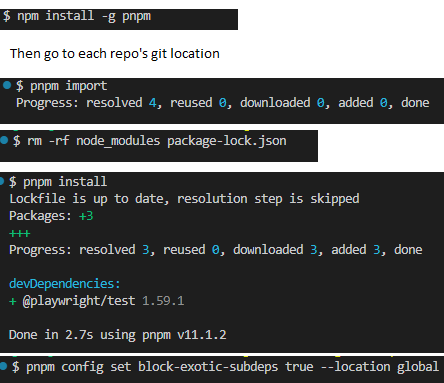
pnpm config set block-exotic-subdeps true --location globalIn most cases setup is pretty straightforward. (In my case I had to teach pnpm to use my D drive instead of C since my C drive doesn’t have much space so that was a bit of an adventure.)
npm install -g pnpmyou still use npm once to install pnpm itself.
- Run this in the root of each project (where your package.json & git folder lives)
pnpm importIt converts your existing lockfile, so no surprise version changes.
rm -rf node_modules && pnpm install
reinstalls using pnpm’s store.
pnpm config set block-exotic-subdeps true --location globalAfter that pnpm takes over. In addition to the extra security, you also get automatic space savings. Instead of every project having its own copy of TypeScript or React in node_modules, pnpm keeps one shared copy and hardlinks to it from each project.
If you don’t want to switch package managers, the 24 hour age check is available in npm, yarn and bun too, its just off by default. For npm you would target:
minimum-release-age=1440`This guide gives tips on how to do this with npm, pnpm, and yarn. And yes, in the syntax episode they also commented how annoying it is that everything uses a different name for this feature haha.
Link to the Syntax episode: https://www.youtube.com/watch?v=kYqpxJE4DyE
It’s still wild to me that the recent worm attacked TanStack and other popular packages not through any fault of their teams, but because of vulnerabilites in GitHub Actions!

WRITTEN BY
Comments
Thanks, this is really helpful.